Lab 1 - Vectors and Matrices
This notebook demonstrates the use of vectors and matrices in IPython. Note that the basis is not explicit in any of these operations. You must keep track of the basis yourself (using variable names, or notes etc).
from numpy import array, dot, outer, sqrt, matrix
from numpy.linalg import eig, eigvals
from matplotlib.pyplot import hist
%matplotlib inlinerv = array([1,2]) # a row vector
rvarray([1, 2])cv = array([[3],[4]]) # a column vector
cvarray([[3],
[4]])Two kinds of vector products we’ll see: inner product (dot product) and outer product
1) Use the function dot(vector1, vector2) to find the dot product of rv and cv. Does the order of the arguments matter?
dot(rv,cv)array([11])# uncomment and run this line, it should give an error, make sure you understand why
# dot(cv,rv)2) Use the function outer(vector1, vector2) to find the outer product of rv and cv. Does the order of the arguments matter?
outer(rv,cv)array([[3, 4],
[6, 8]])outer(cv,rv)array([[3, 6],
[4, 8]])II. Complex vectors
# Complex numbers in python have a j term:
a = 1+2j
v1 = array([1+2j, 3+2j, 5+1j, 4+0j])The complex conjugate changes the sign of the imaginary part:
v1.conjugate()array([1.-2.j, 3.-2.j, 5.-1.j, 4.-0.j])3) Use dot() and .conjugate() to find the dot product of v1 and it’s own conjugate:
dot(v1.conjugate(),v1)np.complex128(60+0j)III. Matrices
# a two-dimensional array
m1 = array([[2,1],[2,1]])
m1
array([[2, 1],
[2, 1]])# can find transpose with the T method:
m1.Tarray([[2, 2],
[1, 1]])# find the eigenvalues and eigenvectors of a matrix:
eig(m1)EigResult(eigenvalues=array([3., 0.]), eigenvectors=array([[ 0.70710678, -0.4472136 ],
[ 0.70710678, 0.89442719]]))Can also use the matrix type which is like array but restricts to 2D. Also, matrix adds .H and .I methods for hermitian and inverse, respectively. For more information, see Stack Overflow question #4151128
m2 = matrix( [[2,1],[2,1]])m2.Hmatrix([[2, 2],
[1, 1]])eig(m2)EigResult(eigenvalues=array([3., 0.]), eigenvectors=matrix([[ 0.70710678, -0.4472136 ],
[ 0.70710678, 0.89442719]]))# use a question mark to get help on a command
eig?Examples:
Example 1.4
Find the eigenvalues and eigenvectors of M = ([0,1],[-2,3]])
M14 = array([[0,1],[-2,3]])eig(M14)EigResult(eigenvalues=array([1., 2.]), eigenvectors=array([[-0.70710678, -0.4472136 ],
[-0.70710678, -0.89442719]]))Interpret this result: the two eigenvalues are 1 and 2 the eigenvectors are strange decimals, but we can check them against the stated solution:
1/sqrt(2) # this is the value for both entries in the first eigenvectornp.float64(0.7071067811865475)1/sqrt(5) # this is the first value in the second eigenvectornp.float64(0.4472135954999579)2/sqrt(5) # this is the second value in the second eigenvectornp.float64(0.8944271909999159)eigvals(M14)array([1., 2.])Signs are opposite compared to the book, but it turns out that (-) doesn’t matter in the interpretation of eigenvectors: only “direction” matters (the relative size of the entries).
Example: Problem 1.16 using Ipython functions
M16 = array([[0,-1j],[1j,0]])evals, evecs = eig(M16)evecsarray([[-0. -0.70710678j, 0.70710678+0.j ],
[ 0.70710678+0.j , 0. -0.70710678j]])evecs[:,0]array([-0. -0.70710678j, 0.70710678+0.j ])evecs[:,1]array([0.70710678+0.j , 0. -0.70710678j])dot(evecs[:,0].conjugate(),evecs[:,1])np.complex128(-1.6653345369377348e-16j)Part 2: Using QuTiP
Keeping track of row and column vectors in Ipython is somewhat artificial and tedious. The QuTiP library is designed to take care of many of these headaches
from qutip import *# Create a row vector:
qv = Qobj([[1,2]])
qv# Find the corresponding column vector
qv.dag()qv2 = Qobj([[1+2j,4-1j]])
qv2qv2.dag()Vector products in QuTiP
Only need to know one operator: “*” The product will depend on the order, either inner or outer
qv2*qv2.dag() # inner product (dot product)(22+0j)qv2.dag()*qv2 # outer productMatrix in QuTiP
qm = Qobj([[1,2],[2,1]])
qmqm.eigenenergies() # in quantum (as we will learn) eigenvalues often correspond to energy levelsarray([-1., 3.])evals, evecs = qm.eigenstates()evecsarray([Quantum object: dims=[[2], [1]], shape=(2, 1), type='ket', dtype=Dense
Qobj data =
[[-0.70710678]
[ 0.70710678]] ,
Quantum object: dims=[[2], [1]], shape=(2, 1), type='ket', dtype=Dense
Qobj data =
[[0.70710678]
[0.70710678]] ],
dtype=object)evecs[0]Practice:
Problem 1.2 using the hist() function.
# Solution
n, bins, patches = hist([10,13,14,14,6,8,7,9,12,14,13,11,10,7,7],bins=5,range=(5,14))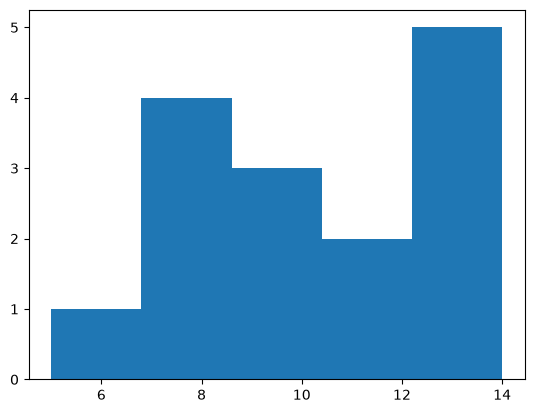
# Solution
n
array([1., 4., 3., 2., 5.])# Solution
pvals = n/n.sum()Problem 1.8
Hint: using sympy, we can calculate the relevant integral. The conds=‘none’ asks the solver to ignore any strange conditions on the variables in the integral. This is fine for most of our integrals. Usually the variables are real and well-behaved numbers.
# Solution
from sympy import *
c,a,x = symbols("c a x")
Q.positive((c,a))
first = integrate(c*exp(-a*x),(x,0,oo),conds='none')
print("first = ",first)
second = integrate(a*exp(-a*x),(x,0,oo),conds='none')
print("second = ",second)
first = c/a
second = 1